Essential room
The smallest dependable system.
Venue Wi-Fi or hotspotConferencing laptopPA speakerRoom microphones
Hybrid meetings work when people online can hear every person in the room—and people in the room can hear every person online. Build the sound path first. Add cameras and screens second.
Designed for volunteer teams, shared venues, and mixed in-room/online audiences.
Online conferencing reduces travel and makes name tags, transcripts, shared presentations, and anytime questions possible. In-person meetings are better at body language, personal interaction, and deeper connection. A hybrid meeting bridges the two only when conversation crosses the boundary clearly.
Poor audio prevents remote participants from following or contributing. A missing camera angle is inconvenient; a missing voice excludes someone from the meeting.
The chair's room rule: speak only after being recognized—and only with a microphone.
The source setup scales from one dependable conferencing computer to a multi-camera, multi-display room. Each added client joins the same conference with its speakers and microphone off.
The smallest dependable system.
Separate the shared content from the audio operator.
Add angles without creating more sound sources.
The original diagram is restructured around the decision operators make in the room: audio, camera views, displays, and online connections. Audio gets the clearest path and the strongest warning.
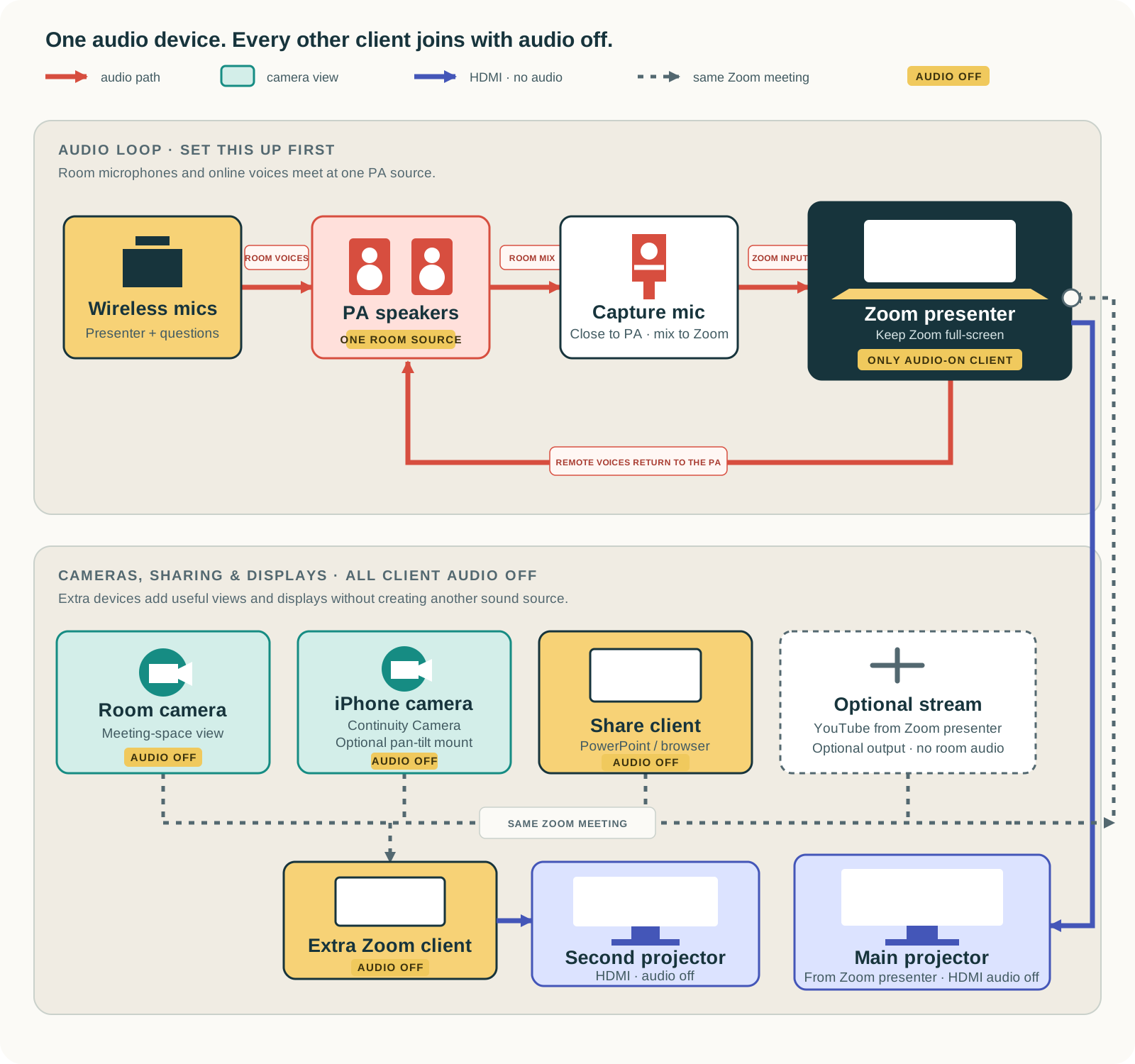
When the room gets busy, return to these operational truths.
The main room hears the conference through one PA. Everyone in the room speaks into a microphone. The conferencing laptop captures that PA mix.
Additional laptops and smartphones can supply screen shares and camera views, but they join with their local audio off.
Confirm venue coverage before the meeting. Bring a hotspot if coverage is inadequate; a 5G smartphone may provide that connection.
Use the setup guide to build the room in four passes, then keep the complete manual open for camera options, operating rules, equipment references, and troubleshooting.